
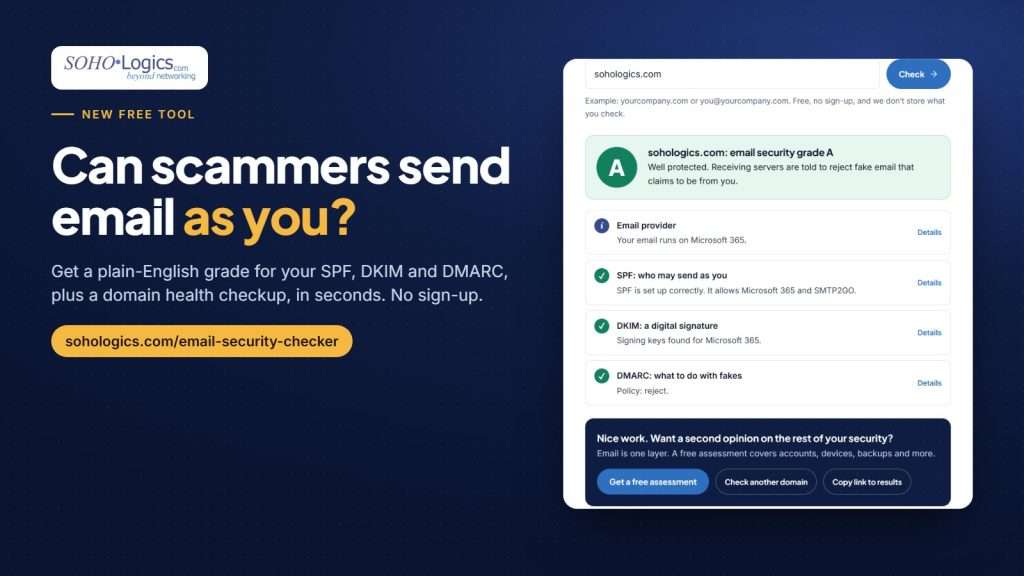
Here’s a scam that costs small businesses real money. A customer gets an email that looks exactly like it came from you: your name, your domain, your usual sign-off. It says your bank details have changed and asks them to pay this month’s invoice to a new account. They pay. You never sent it.
That’s email spoofing, and it works because email on its own has no built-in proof of who sent it. Three settings in your domain’s DNS fix that, but most business owners have never heard of them, let alone checked them. So we built a free tool that checks them for you.
Try it now. It takes about 10 seconds and there’s no sign-up.
How the free email security checker works
- Go to the Email Security Checker.
- Type your business domain (like yourcompany.com) or your work email address.
- Get a letter grade from A to F, with a plain-English explanation of each part and what to fix.
It checks the three records that decide whether someone can send email as you:
- SPF lists the services allowed to send email for your domain, and the checker names them for you (for example, “It allows Microsoft 365 and Mailchimp”).
- DKIM adds a digital signature to each message. The checker finds your signing keys, tells you which service each belongs to and whether the key is strong enough.
- DMARC tells receiving servers what to do with email that fails those checks: nothing, send it to spam, or block it.
Below your grade, a domain health checkup looks at the domain itself: who it’s registered with and when it expires, whether it’s locked against being transferred away, who hosts your DNS, whether your website loads securely, and a few optional extras.
What your grade means
- A: Your records tell receiving servers to reject fake email that claims to be from you. Receiving systems make the final call, but this is the goal.
- B: Your records tell receiving servers to send fakes to spam. Usually one setting away from an A.
- C: You’re monitoring, but fakes still reach inboxes.
- D: Something important is missing or broken.
- F: Anyone can send email as you, and most inboxes won’t know the difference.
If some lookups can’t finish, the result is marked partial (for example B*) with a Check again button, and the checker never shows an unqualified A until every key check has completed.
Problems the checker catches
These are common issues on small-business domains:
- DMARC stuck on “monitoring only.” Someone set up DMARC with p=none years ago, meant to tighten it later, and never did. It reports on fakes but doesn’t stop them.
- A provider missing from SPF. The business moved to Microsoft 365 or Google Workspace but the old SPF record never got updated, so its own email lands in spam.
- Two SPF records. This breaks SPF entirely, and it’s an easy mistake to make when adding a new service.
- DKIM never turned on. Microsoft 365 doesn’t sign email with your own domain until someone switches it on.
- An unlocked or nearly expired domain. A lapsed domain takes your website and email down with it.
Each problem comes with a “How to fix” line, including the exact admin-center clicks for Microsoft 365 and Google Workspace.
Save it as a PDF, or email it to yourself
Not the person who handles your IT? Click Download PDF report and you get a clean, one-page report with your grade, every finding and how to fix it. Or click Email me this report and we’ll send a copy to your inbox. Either way, hand it to your office manager, your IT provider or whoever manages your domain.
We checked our own domain first
Before we published the tool, we ran it on sohologics.com. We were a B: our DMARC sent fakes to spam but didn’t block them, and we weren’t collecting reports. We added reporting, confirmed every service that sends our email was set up correctly, and moved to “reject.” Today sohologics.com grades an A.
Your domain stays private
The checker runs in your browser and looks up public records only, using public DNS lookups (through Cloudflare, with Google as a backup) and the public domain registration service. The domain you type isn’t sent to or stored by our server, unless you ask us to email you the report or set up monitoring. It can’t see private settings such as accounts, devices or backups. You can check your vendors’ and partners’ domains too, which is a smart move before you trust an email about payments.
Got a grade below A?
Fixing SPF, DKIM and DMARC takes a few DNS changes, but the order matters: jump straight to “reject” and you can block your own invoices and newsletters. We do it in steps, starting with reporting, then fixing every sender, then tightening the policy. It’s part of our cybersecurity services.
Email is one of the basics worth checking. Our small business cybersecurity checklist walks through 11 more, from multi-factor authentication to tested backups.
Run the free check, then let us know if you want help getting to an A.
